XLaunchpad: A Free Personalization Tool

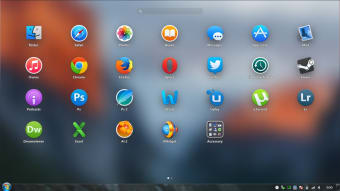
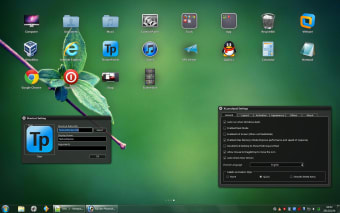
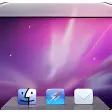
XLaunchpad is a free personalization application designed for Windows, enabling users to enhance their desktop experience. This program allows for the creation of a customizable dock, reminiscent of macOS's dock, where users can easily access their favorite applications and files. With its user-friendly interface, XLaunchpad provides a visually appealing way to organize shortcuts and streamline workflow on your desktop.

Top Recommended Alternative

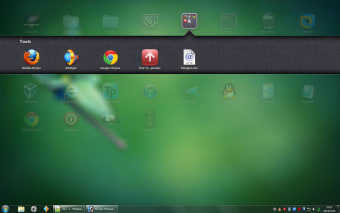
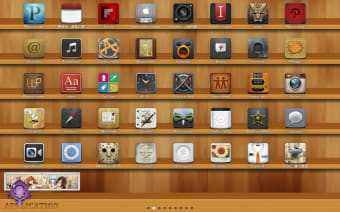
The application offers various features, including drag-and-drop functionality for adding items to the dock, customizable themes, and the ability to adjust the size and position of the dock according to user preferences. XLaunchpad not only boosts productivity by keeping essential tools within reach but also adds a modern touch to the Windows desktop environment.


 0/4

App specs

  • License

    Free

  • Version

    1.8
  • Latest update

  • Platform

    Windows

  • OS

    Windows 8

  • Language

    English

  • Downloads

    59K

    Last month's downloads

    • 36
  • Size

    2.44 MB

  • Developer

Program available in other languages


User reviews about XLaunchpad

3.5

1 reviews

Add review

Main reviews for you

  • Anonymous user

    Xlaunchpad almost there. I haven't used the app xlaunchpad is based on, but I've been a long-time fan of Rocketdock, a quick access application launcher/sorter (a la Mac). There was nothing to match it until now. Well, mostly. Xlaunchpad is intuitive and slick. It appears over the screen so it has a lot more space to organize applications and folders, and creating those folders, as with the iphone, is as simple as dropping one icon onto another. Wonderful if you wish to access a lot of frequently used applications, project folders, current audiobooks and whatnot. The only fly in the ointment (and this may be limited to my aging machine) is that it becomes unresponsive, requiring the Task Manager to kill the process. Frustrating for an otherwise perfect app. Pros: Quick, intuitive, elegant. Best app of its kind I've seen. Cons: Sometimes becomes unresponsive and has to be restarted. Would like explanation of Desk Mode, etc.


More

You may also like

Alternatives to XLaunchpad

Explore Apps

Latest articles

Laws concerning the use of this software vary from country to country. We do not encourage or condone the use of this program if it is in violation of these laws.
Softonic

Is XLaunchpad safe?

97/100

Score result: Clean

This file passed a comprehensive security scan using VirusTotal technology. It is safe to download.

  • Virus free
  • Spyware free
  • Malware free
  • Verified by Security Partners

    VirusTotal logo

Scan Info

Last scan
Tuesday, November 21, 2023
Scan provider
VirusTotal · Full report

File Integrity

File
xlaunchpad_setup.zip
SHA256
ad6a05c029d1fd3f2afb6f8f2dc01757271f54b85d1e1022d69bc12336589c5b
SHA1
321b5fb48370eea7ea55aca33469a97ca0f2148e

Softonic security commitment

XLaunchpad has been thoroughly scanned by our advanced security systems and verified by industry-leading partners. This file comes from the official developer and has passed all our security checks, showing no signs of viruses, malware, or spyware. For more information, visit our Security and Trust Center